SAPAA’s new Site Inspection Report tool, is launching on April 6, 2026. The system allows members to log in, report recent visits, review past inspections, and upload images. Access must be requested.
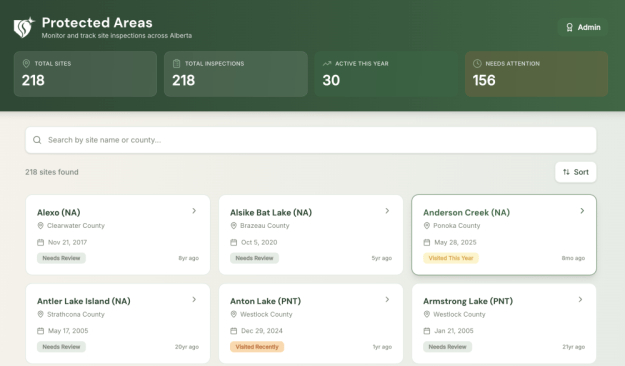
Collecting information on Alberta’s Protected Areas is a cornerstone activity of SAPAA. Over the past two years, the organization has been developing its Site Inspection Report (SIR) capacity. On April 6, 2026, SAPAA is launching v1.0 of SIR-SAPAA. Key features of this tool include:
- Controlled Access to the Tool.
- Online reporting of recent visits.
- Review past visits from other SAPAA Members and contributors.
1. SIR-SAPAA, Request Access
If you are a current SAPAA member or an invited guest, complete the following form to request access. If you are none of these, feel free to sign up to be a SAPAA member to gain access. This form is the first of two steps. The second step is to create a SIR-SAPAA account, see below for details.


2. Create a SIR-SAPAA Account
After agreeing to the above terms and conditions, using the SAME email as above, create a SIR-SAPAA account by visiting this link: SIR-SAPAA Create Account. You can register with SIR-SAPAA one of two ways:
- Enter your email and create password. This works best for non-Gmail or non-Microsoft accounts. For example, apple, shaw.com, yahoo.ca, etc.; OR
- Use a GMail or Microsoft account. These methods use the respective sign in methods of the systems. They vary widely depending on how you have set them up. Some information is shared with SIR-SAPAA (e.g. profile name and photo).
- Confirm Your Email. Like most systems, a verification email will be sent to you. The email may be hiding in your junk folder.
- Wait for the Approval Email. Your request to access the account will be evaluated. Once approved, look for an email from SAPAA. Use the same sign in method you used to create the account. Following the directions on the welcome email.
Who Is ON the List?
Because of a prior agreement with the government of Alberta, access is restricted to current SAPAA Members and board-invited guests. The following table lists what different user communities can access and do within the application. These communities are as follows:
- SAPAA: Current SAPAA Members, Board, and contributing volunteers.
- Guest: The SAPAA Board will selectively offer access to past members, individuals, and organizations who have contributed to SAPAA’s objectives.
- Public: Members of the public.
Who Can Do What?
The following table lists what the above communities can do when accessing the SAPAA Website (this site), Google Site Inspection Form, and the SIR-SAPAA.
| Access | SAPAA, Guest | Public |
|---|---|---|
| Website | Public Access | Public Access |
| Google SIR Form | Alternative submission method. | Only method to submit a SIR |
| SIR-SAPAA | After Access has been granted | No Access |
| – Upload Images | Site inspection or other photo upload | Provided manually |
| – Review past SIRs | Access all past inspections. | Request an extract with redaction |
| – What are Other Members Doing | See recent activities by other members | No Access |
 SAPAA
SAPAA 
Pingback: Alberta Rural MLAs and SAPAA – 2026-03-20 | SAPAA
Pingback: SIR Dragon – March 19, 2026 – 1200pm | SAPAA