Files, images, and other content comes to SAPAA from a variety of sources. Not all will be used on the website. This guidance discusses SAPAA ‘pre-website’ image management.
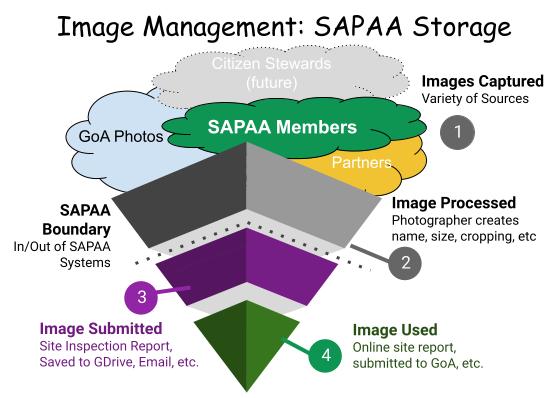
Overview
Files including images, documents, audio files, etc. are generally stored in the NA’s folder. When a file crosses two or more NA, then it is stored in a common folder such the newsletter.
The SAPAA File structure is managed via the “SAPAA-WebFileStructure” control file.
Imaged Processed
This page is about where to store images that come to SAPAA. Website Image-Management discusses how images are used on the website include the first step, 1. Preparing. This includes discussion on the image’s size, naming conventions, and metadata.
Conventions and the Rule of (about) 100
The naming and file size conventions follows Website Image-Management standards. ‘One-off’ images can be stored directly in the NA’s folder. Ideally though they are organized into sub-folders such as site visits, for example:
- _NA-OC
- > Carnewood-Modeste
- >> 2029-12-31-Visit
- >> 2031-06-30-Visit
- >> 199X-Images
- >> 201X-Images
- > Carnewood-Modeste
The Rule of (about) 100 is that when there are about 100 files in a folder, they should be organized into one or more sub-folders. 100 is a maximum number and ideally sub-folders are created prior to reaching this number.
Organization Structure
The following Graphic shows the current organization structure which generally follows the Rule of (about) 100. Because they are fewer in number, ER, HR, and WA are stored directly below the SAPAA Web Folder

 SAPAA
SAPAA 