The SAPAA content encompasses various formats like web pages and files uploaded via Google Workspace (GWS). It categorizes files into Program Year, Protected-Areas, and Enduring files.
This is part of a series on How We Do Things.
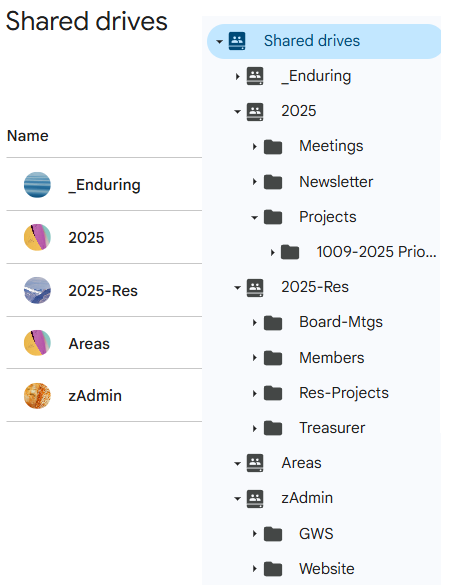
SAPAA content takes many forms including web pages, geographic information (e.g. Google maps), images, sound recording, files, etc. This procedure is specific documents created either via the Google Workspace or external to it but subsequently uploaded to it. Images and web pages have other procedures which are listed in the further reading section.
Four (+one) Page Types
Files can be broadly broken down into four categories:
- Program Year: Specific to a single program year, most content.
- Protected-Areas: Specific to an area.
- Enduring: Transcends 2+ program years, non-technical.
- Technical: Relating to the website, Google Workspace, etc.
1. Program Year Structure
Each year, the board will consider and adopt the program year structure. Any changes are first made to a template folder which is then copied to become the new program year folder.
- YEAR (e.g. 2099, prior years are prefaced with ‘zz’, e.g. zz2098).
- >> Public Meetings
- >> Newsletter (inputs, working files, and pdf versions of newsletters)
- >>> [MONTH]-[YEAR]-[No.999] (Dec-2098-No.987).
- Projects (ad hoc and planned activities of the board such as site inspection report, field trip details, etc. ).
- The board may start a Project in the restricted folder and later move it to this more public Shared Drive
1+ Program Year Restricted
These files are restricted to the board and administrators. They contain protected information such as member details, board confidences, etc.
- YEAR-Res (e.g. 2099-Res, prior years are prefaced with ‘zz’, e.g. zz2098-Res).
- >> Private Meetings (board, GoA)
- >> Membership
- >> Protected Area Contact Details
- Treasurer (financial statements, etc. Confidential information may be stored in the Treasurer’s ‘My Drive’).
2. Protected Area Structure and Filing Rules
These files are based on the legacy website and are used to support the existing website. The general rule is that files are saved here first before being uploaded to the Media Library of sapaastewards.com.
They are generally organized by the WAERNAHR classification. Groupings that have a larger number (e.g. OC’s) have their own sub-folder. If there is two or more classifications associated with a site (e.g. Coyote Lake NA OC and PNT), files are stored in the higher classification folder and not duplicated in the other folder.
All of the Protected Area folders use the format shown under the NA-OC example. Photos are stored in a distinct sub-directory and files generally are stored at the root level of the folder. If the number of files exceeds an acceptable number, sub-directories can be created.
- __SupportFiles (used to control and manage the website)
- _NA-OC (Natural Areas, Order in Council)
- [SITE]
- Photos
- Relevant sub-directories
- [SITE]
- NA-PNT CNT (Natural Areas, Protected Area or Conservation Notation)
- Ecological Reserves, Heritage Rangelands, Wilderness Areas
- zWebArchives (2011 website and non-current documents)
- zTransferredPAs (protected areas transferred, amalgamated, or delisted and not recorded elsewhere).
3. Enduring Files
Enduring files are those that are relevant to two or more program years. Examples include Bylaws, important GoA documents, or approved strategic plans. Protected-Areas files are relevant to one such location.
A document should be approved by the board before adding it to the enduring folder. This ensures a good awareness of these resources and resists the temptation to ‘dump it there’.
During a typical program year, at most 1-2 enduring files are created and many program years will produce none. As a result, virtually all files are found with a program year.
4. Technical Documents
These files support a computer system environment such as the website, Google Workspace, Site Inspection, etc. Development of the files should be done in the program year (e.g. as a project) with the FINAL result stored here. Current Technical Documents include:
- zTech-Procedures (Note, policies are stored under _enduring).
- GWS: Google Workspace.
- Website: sapaastewards.com.
GWS File Share Settings
| Share | Setting | Value |
| [YEAR] | Managers Modify: | YES |
| [YEAR] | Outside Access: | YES |
| [YEAR] | Allow non-share drive: | YES |
| [YEAR] | Content Mgrs Share: | YES |
| [YEAR] | View/Comment: Download, print, copy: | YES |
| [YEAR]-Res | Managers Modify: | YES |
| [YEAR]-Res | Outside Access: | NO |
| [YEAR]-Res | Allow non-share drive: | NO |
| [YEAR]-Res | Content Mgrs Share: | NO |
| [YEAR]-Res | View/Comment: Download, print, copy: | NO |
| Areas | Managers Modify: | YES |
| Areas | Outside Access: | YES |
| Areas | Allow non-share drive: | YES |
| Areas | Content Mgrs Share: | YES |
| Areas | View/Comment: Download, print, copy: | YES |
| Enduring | Managers Modify: | YES |
| Enduring | Outside Access: | YES |
| Enduring | Allow non-share drive: | YES |
| Enduring | Content Mgrs Share: | YES |
| Enduring | View/Comment: Download, print, copy: | YES |
| zAdmin | Managers Modify: | YES |
| zAdmin | Outside Access: | NO |
| zAdmin | Allow non-share drive: | NO |
| zAdmin | Content Mgrs Share: | NO |
| zAdmin | View/Comment: Download, print, copy: | NO |
 SAPAA
SAPAA 