How the 2023 (and possibly subsequent years of data) is managed for display on the website.
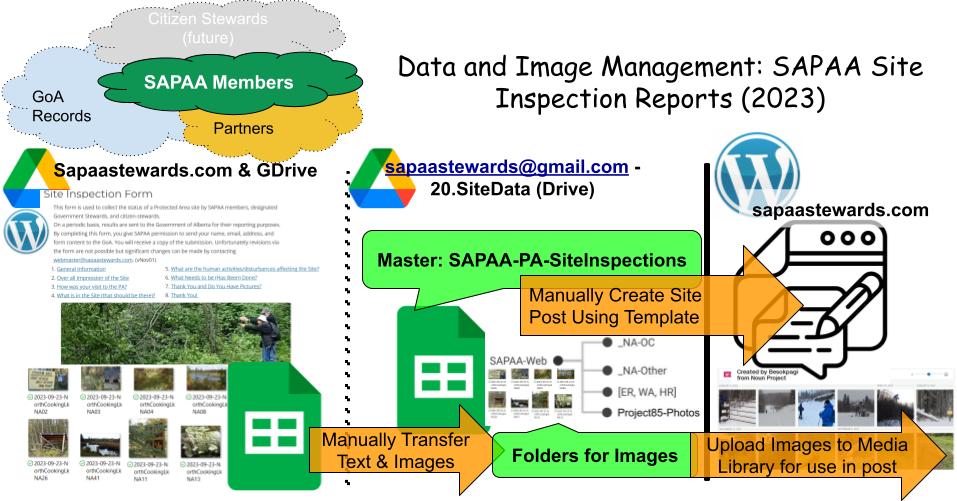
SAPAA uses the Site Inspection Form to collect Site Inspection information. This information is saved to the master site inspection file, processed and exported for use in a WordPress Site Inspection report (see the following process flow for more details).
SAPAA uses a staging and permanent store model to manage its site inspection reports, per the above graphic.
Site Inspection Staging Area
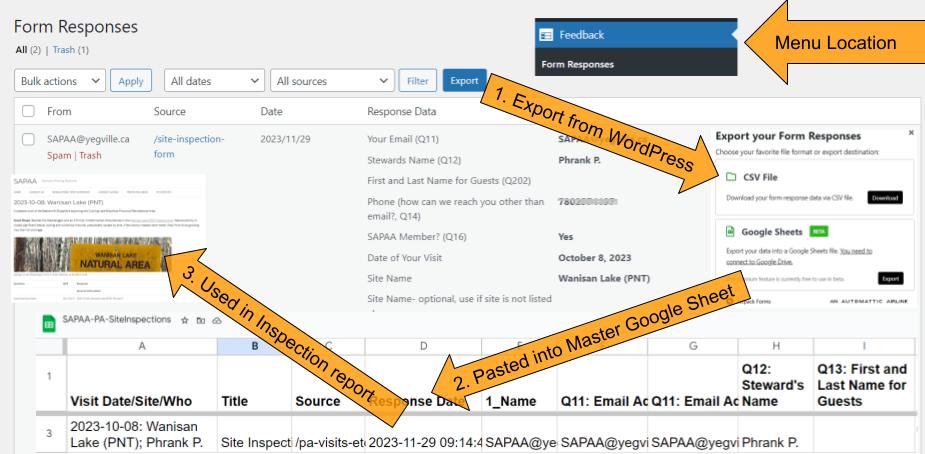
When a user submits data via a WordPress Form, it is stored as a ‘Form Response’. Extraction is possible via a CSV file which is then transferred manually to the SAPAA Masterfile. Separating these two activities allows for the master file to be a permanent record and submission file to evolve as data collection needs change.
20.SiteData (Drive) and SAPAA-Web GDrives
Which Gmail Account?
The permanent storage of the site inspection report submissions is done on a GDrive hosted under the account sapaasteward@gmail.com. This is one of the Gmail accounts used by SAPAA, the other being adm.sapaa@gmail.com.
20.SiteData – Site Inspection Data (but not images)
After a site inspection report has been submitted, the webmaster (or others) reviews it for accuracy, completeness, etc. As required, the submitter may be asked to complete or correct information.
Once complete, the row is copied from the staging area (defined by the Google form) to its permanent home; currently a Google Sheet in the 20.SiteData > SAPAA-PA-SiteInspections.
SAPAA-Web – Images
Submitters cannot upload images as part of the site inspection report. Images are saved to the GDrive for the area of interest if the user has access. After saved here (for long term storage), then images can be uploaded to the media library. How to do this is discussed in two separate guidance’s: Pre-Website Image-Management and Website Image-Management.
For individual who do not have access, images can be emailed to the webmaster who will do the above steps.
Data Dictionaries and Documentation
As noted above and elsewhere, the 2023 Site Inspection report and process is a proof of concept. The objective is to better understand the data, rules, processes, and governance of collecting this information for future development and use.
Data dictionaries and documentation such as this will be used to harvest the knowledge generated by in 2023 for future years.
 SAPAA
SAPAA 
Pingback: Dragons and Protected Areas – April 4, 12-13h | Organizational Biology